

For various reasons, you may want to download Netflix movies to an external hard drive, such as backing up titles that are about to be removed from the platform. But is this actually possible? Unfortunately, Netflix does not officially support saving downloaded content to an external hard drive. In fact, the Netflix desktop app no longer supports downloading at all, and downloads on mobile devices are restricted to internal storage only. That said, there is still a workaround available, and we will walk you through it.
Downloaded Netflix content is intended for personal viewing only.
How to Download Netflix Movies to External Hard Drive from Desktop
Beyond backup, saving videos to an external hard drive offers other benefits as well, such as freeing up storage space on your device and being able to plug the drive into any other device to watch your videos anytime.
Before we discuss the step-by-step procedure on how to download Netflix movies to an external hard drive, let us first understand the prerequisites.
1. Check Your Netflix Subscription Plan
Ensure you have a Netflix plan that supports downloads:
- The Basic Plan allows downloads on one device.
- The Ad-supported Plan lets you download on two devices, with a limit of 15 downloads per device per calendar month.
- The Ad-free Plan supports up to 100 active downloads per device.
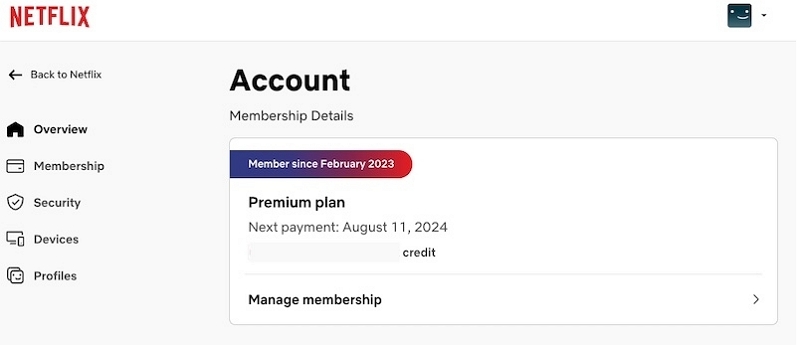
- To check your Netflix subscription plan, log in to your account, navigate to Account Settings/Account, and view your plan details under the Membership Details section.
2. Ensure Sufficient Storage Space
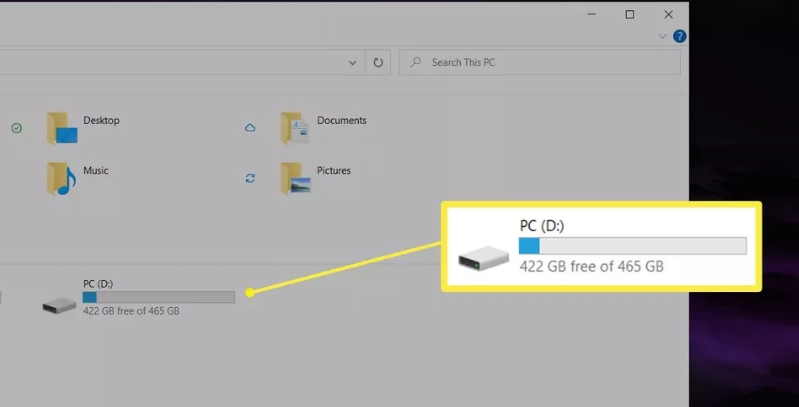
Make sure your external hard drive has enough storage. Netflix offers two download quality options:
- Standard Quality(480p): Faster downloads, less storage required (e.g., ~300 MB for a 1-hour 15-minute movie).
- High Quality: Up to 1080p resolution but takes more space and time (e.g., ~1.25 GB for the same movie).
3. Verify Content Availability for Download
Not all Netflix content is downloadable. Look for the Download icon next to the movie or show title.
Steps to Download Netflix Titles to External Hard Drive
Mediaio Video Converter is your all-in-one solution for saving and enjoying Netflix content anywhere, anytime. This powerful tool lets you save Netflix movies, TV shows, documentaries, and more directly to an external hard drive, USB stick or SD card, offering unmatched convenience. It can convert streaming videos to local formats like MOV, MKV, and MP4 that are compatible with most of the media players or devices. Each video's subtitles will be saved in VTT or SRT format. The downloaded videos are high quality, with support for up to 4K resolution. Of course, you can also choose other quality options such as 1080p, which results in smaller file sizes and helps save storage space on your external hard drive. You also don't need to worry about spending a long time downloading a 2-hour movie. Mediaio's 10x speed download feature handles the process efficiently, so you can get your content quickly.
Step 1: On your computer, install and open Mediaio Video Converter and navigate to Netflix.
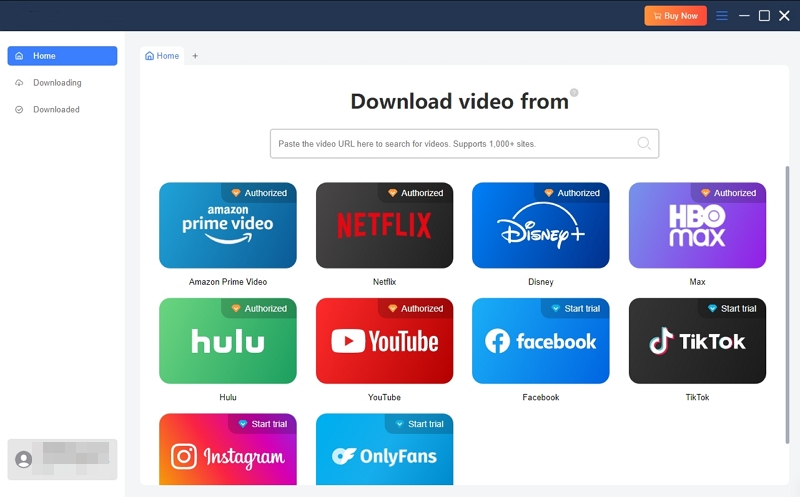
Step 2: Sign in using your login credentials and enter your Netflix video account details.
Step 3: Search for your desired content in the Netflix Library by pasting the movie URL or typing the name into the search bar. Alternatively, navigate the in-built Netflix website to find your favorite content.
Step 4: Set up your video and output setting by clicking the triangular button under "Video Quality." You can adjust the resolution and audio and subtitle languages depending on your individual preferences. If you have connected the external hard drive to your computer before, you can directly set it as output storage at the lower left corner.
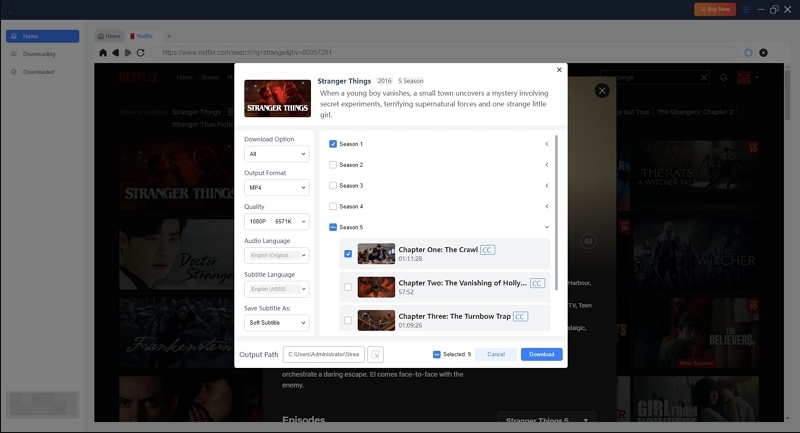
Step 5: Download Netflix Video by clicking the Convert button.
The following 2 steps are required if you have saved the downloaded Netflix movies to internal storage.
Step 6(Optional): Access the downloaded content in the Mediaio download folder.
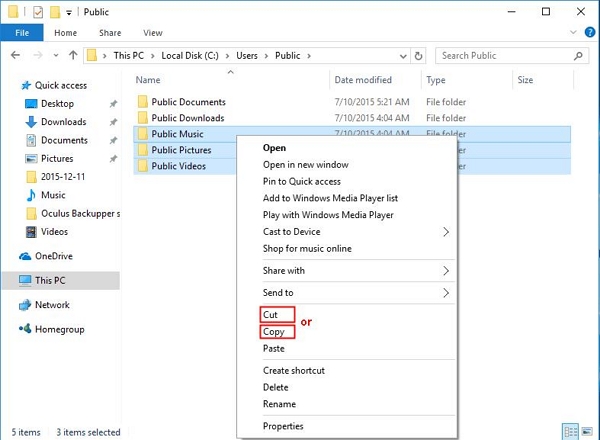
Step 7(Optional): Select the specific downloaded Netflix videos and move them to your external hard drive.
How to Connect External Hard Drive and Access Netflix Videos on iPhone
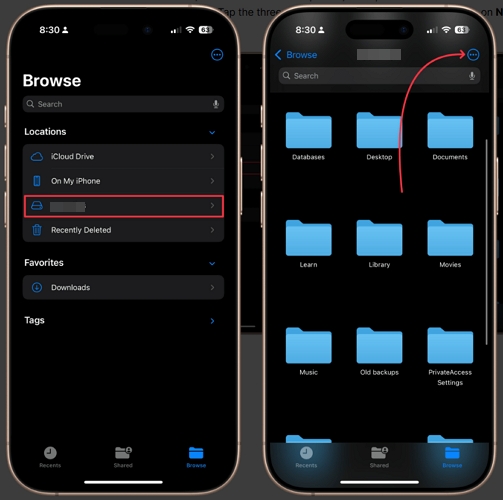
1. Connect your external hard drive or USB drive to your iPhone using a Lightning to USB adapter or USB-C to USB adapter (depending on your iPhone model).
2. Open the Files app on your iPhone. Under the Locations section, you should see your external drive listed. Just tap the external drive name.
3. Tap the Netflix file to play it directly in the Files app or tap and hold to open it with a compatible app such as VLC.
How to Play Netflix Videos from External Drive on Android
- Connect your external hard drive to your Android device using a USB-C to USB adapter or OTG cable.
- Open your Files app (or File Manager) on your Android device.
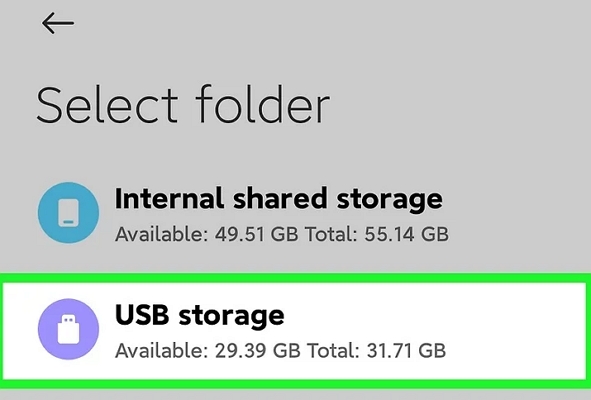
- Look for your external drive under Storage or USB Storage.
- Tap on the external drive to browse its contents.
- Navigate to the folder where your videos are saved.
- Tap the video file to play it with your default video player.
Bonus: How to Download Netflix Movies to SD Card on Android
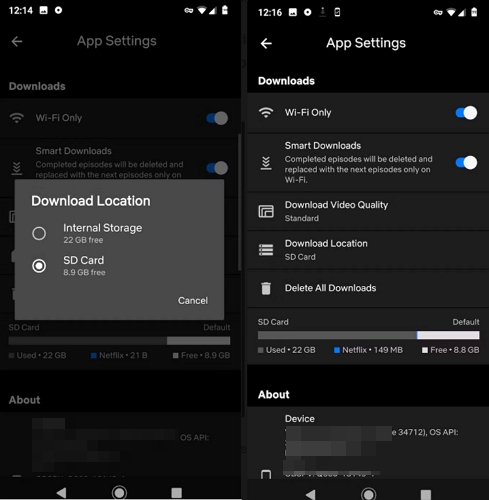
Netflix's mobile app supports downloads, so you may wonder whether you can save downloaded content to an external hard drive on your Android phone. Unfortunately, this is not possible. The Android Netflix app only supports saving downloads to internal storage or an SD card. It is worth noting that videos saved to an SD card are not in a local file format — they remain encrypted and can only be played within the Netflix app. However, doing so can help free up your phone's internal storage space.
- Open the Netflix app on your Android device. Tap your profile icon in the top right corner.
- Tap App Settings.
- Under the Downloads section, tap Download Location.
- Select SD Card as your preferred download location. All future downloads will now be saved to your SD card.
Conclusion
Netflix is one of the favorite OTT platforms worldwide. While you can watch Netflix movies online, you can download them on your compatible devices and enjoy them at leisure. Third-party software tools like Mediaio Video Converter offer legitimate ways to download and save Netflix content to your external hard drive. Thus, you can watch your favorite content anywhere and at any time, regardless of whether you have an internet connection.