

If you rent a movie on Amazon Prime Video, you might expect to watch it anytime and anywhere, even without an internet connection. This is especially useful for travel, commuting, or situations where Wi-Fi is unreliable. However, many users are unsure whether offline viewing is actually available for rented content, or if it is limited to purchased titles or subscriptions. This leads to a very common question: can you download a rented movie on Amazon Prime? Understanding how Prime Video handles rentals, downloads, and viewing restrictions is important before you start watching, so you don’t run into unexpected limitations later. In this article, we will explain these questions clearly and break down how everything works.
Can You Download a Rented Movie on Amazon Prime?
Yes, you can download rented movies on Amazon Prime Video for offline viewing within the rental period, which is usually 30 days before you start watching. Once you start watching, you typically have 48 hours to finish it.
Supported Devices for Streaming and Downloading
Rentals from Amazon Prime Video can be utilized on numerous devices, providing both flexibility and convenience. However, note that if you download a rented Prime Video movie on one compatible device, you cannot download it on another device.
- Amazon Devices: Fire TV, Fire Stick, and Fire Tablets.
- Smart TVs: Leading brands featuring the Prime Video app already installed.
- Blu-ray Players: Versions that are compatible with the Prime Video application.
- Gaming Consoles: Xbox and PlayStation systems featuring application support.
- Mobile Devices: Smartphones and tablets utilizing the Prime Video application (iOS and Android).
- Computers: Must be compatible with browsers that satisfy Prime Video’s system requirements.
- Media Players and Streaming Devices: Equipment such as Roku, Apple TV, and Chromecast.
With these choices, Amazon Prime Video provides smooth access to your rented films, whether you are at home or traveling.
How to Download a Rented Movie on Amazon Prime
Downloading rented films is an easy task, but it necessitates the use of the Amazon Prime Video app on a compatible gadget. Here’s how can you download a rented movie on Amazon Prime Video.
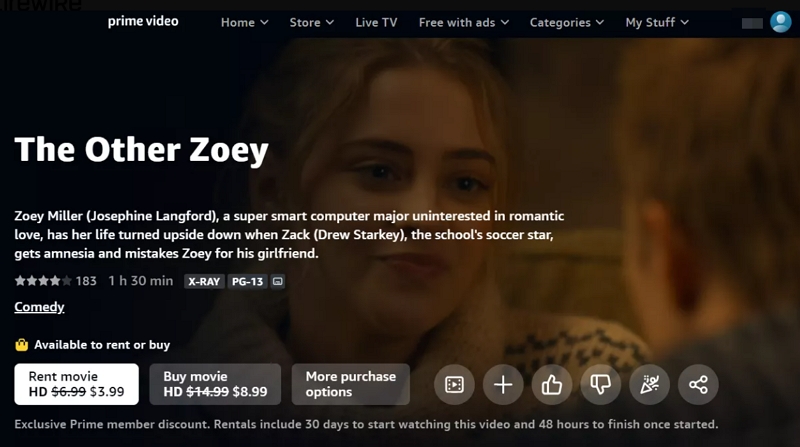
Case 1. Download Right After Renting
1. Go to Amazon Prime Video on your browser or mobile app and sign in to your Amazon account.
2. Search for the movie you want to rent. Click Rent among the options.
3. Select your preferred video quality if available and complete the payment.
Case 2. Download Later After Renting
1. Use the search function locate the rented movie title on the Prime Video app.
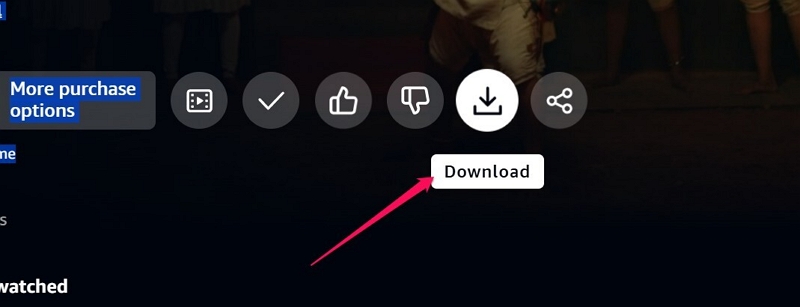
2. Select the movie to access its Details page. You will find the download choice, usually shown next to the film’s description.
3. Press the Download button to store the movie in the app for offline access.
4. Once the download is finished, go to the Downloads area in the app. Then, locate the film in your collection of offline titles and press Play to begin viewing.
By taking these steps, you can effortlessly watch your rented movie without requiring a live internet connection. Just keep in mind that the download will only be accessible for the duration of the rental.
Troubleshoot: Can't Download Rented Movies on Amazon Prime?
- You have already downloaded your rented movie on another device.
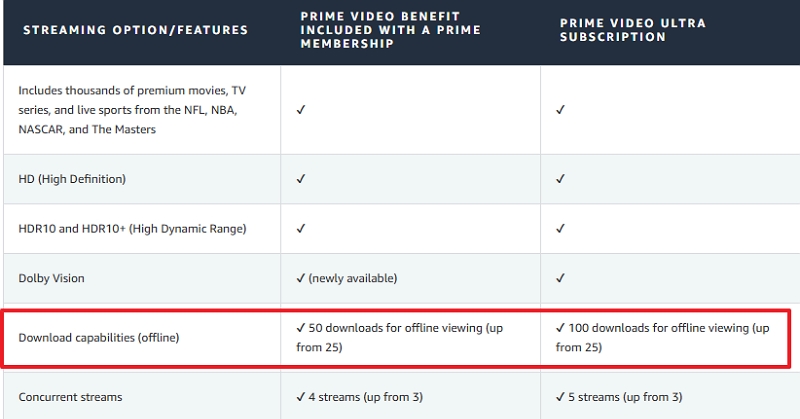
- You have downloaded more than 50 Prime videos and have reached your account’s download limit. If you want to download more, you can upgrade to Ultra, which allows you to download up to 100 videos.
FAQ: If I Rent a Movie on Prime, Can I Watch It Twice?
Yes, you can play a rented Prime video multiple times within 48 hours after you start watching it. After 48 hours, the playback will expire.
Alternative Way to Save a Rented Movie Offline on Amazon Prime
You can also choose to save the rented video as a local file and watch it using a local media player. In this case, you will need Mediaio Video Converter. It can convert Amazon Prime videos, whether they are streaming, purchased, or rented, into local formats, such as MP4, MOV, and MKV. The video quality can go up to 4K, and subtitles are fully preserved. No matter how long the video is, it can be converted quickly thanks to its 10X processing speed. All you need to do is log in to your rented video account within the Mediaio Video Converter interface and then you can start saving your rented videos.
Conclusion
Downloading rented movies from Amazon Prime offers a convenient method to enjoy your favorite films offline. To improve your offline viewing experience with quicker downloads and greater customization, you can save the reneted videos with Mediaio Video Converter.