

You subscribe to HBO Max and use Plex—but you can't find HBO Max content inside your local Plex library. Or you want permanent, offline access that the HBO Max app simply doesn't allow.
The reason most guides on this topic leave people more confused than when they started: there are two completely different goals hiding under the same question, and they require completely different solutions. This guide separates them clearly from the start.
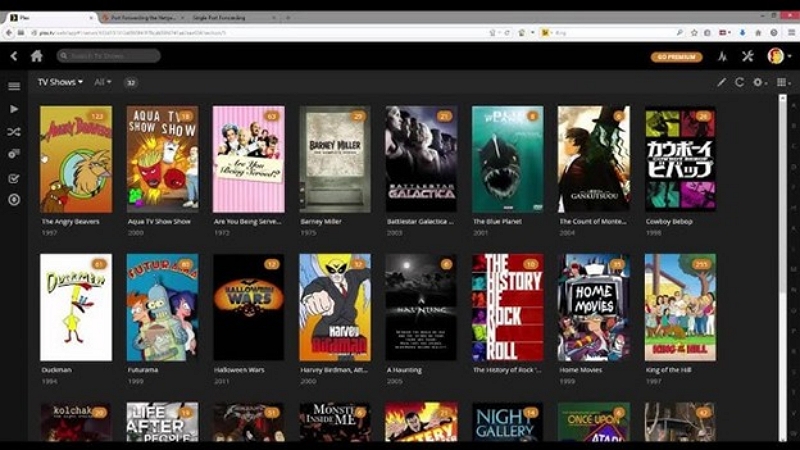
Two Different Things: Plex Discover vs. Your Local Plex Library
Option A — Plex Discover: A unified browsing interface that shows you movies and shows across all your streaming subscriptions in one place. Clicking a title launches the HBO Max app for playback. No files, no downloads, five minutes to set up.
Option B — Local Plex Library: Adding actual video files to Plex so they appear in your personal library with metadata, posters, and episode info—playable offline, shareable with family, and accessible permanently regardless of what HBO Max's catalog does.
These are not the same thing. Option A is what most people actually need. Option B is for users who want full ownership of the file.
Method 1: Link HBO Max to Plex Discover (Free, 5 Minutes)
If you want to browse HBO Max titles inside Plex without managing files—this is the right method.
What Plex Discover actually does: It surfaces HBO Max content in Plex's search and discovery interface. You can add titles to your Plex Watchlist, see what's available across all your subscriptions in one place, and get notified when content becomes available. When you click a title, Plex deep-links you into the HBO Max app (or the Max website, on desktop).
What it doesn't do: Play video inside Plex, sync watch progress back to Plex, or create any local files.
Setup steps
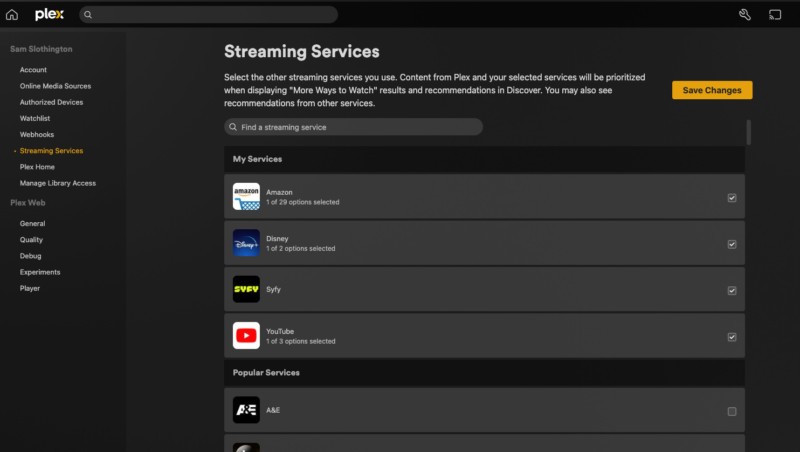
- Open Plex → go to Settings
- Select Streaming Services (under Online Media Sources)
- Check the box next to Max (HBO Max) → click Save Changes
- The Discover section in your left navigation will now surface HBO Max titles alongside your other streaming services
You do not sign in to your HBO Max account inside Plex. Discover only shows you what's available—it doesn't authenticate or play anything directly.
Works on: Roku, Apple TV, Android TV/Google TV, Fire TV, iOS, Android, and Plex web.
Real experience: Plex Discover is genuinely useful once you have multiple streaming subscriptions. Searching for a film and seeing which of your services has it—without opening four separate apps—is a real quality-of-life improvement. The limitation is that watch history and ratings don't sync back into Plex, so your Plex library stays separate from your streaming activity.
Method 2: Add Video Files to Your Local Plex Library
This method gives you a copy of the video in your Plex library—playable offline, streamable to any Plex client, and permanently in your collection.
Why HBO Max files can't be imported directly
HBO Max uses Widevine DRM encryption, the same system Netflix and Disney+ use. Files downloaded through the official Max app are stored as encrypted .exo fragments that only the Max app can decrypt—they can't be opened, converted, or imported by Plex. Screen recorders like OBS and QuickTime output a black screen because Widevine blocks pixel capture at the GPU level.
This isn't a Plex limitation. Plex can import any standard, unencrypted video file. The issue is getting a file in that format.
Legitimate sources for video files you can add to Plex:
- Purchased digital downloads — some platforms (Vudu, Apple TV, Amazon) offer DRM-free downloads for films you've bought
- Physical disc ripping — if you own the DVD or Blu-ray, ripping for personal backup has clearer legal standing in many jurisdictions than streaming DRM circumvention
- Personal video files — content you recorded yourself, independent films, public domain titles from archive.org
The technical steps below work the same regardless of source.
Step 1: Prepare your video files
Plex works best with these formats:
- Container: MP4 or MKV
- Video codec: H.264 (broadest compatibility) or H.265/HEVC (smaller files, more server processing required)
- Audio: AAC or AC3
- Subtitles: External .SRT files (better Plex compatibility than embedded subtitles)
If your source files are in other formats—AVI, WMV, older containers—convert them to MP4/H.264 first. Mediaio Video Converter handles batch conversion of 1000+ formats to MP4 or MKV, preserves embedded subtitles during conversion, and processes full seasons in one queue. This prep step makes the Plex import smoother and reduces transcoding load on your server.
Step 2: Name your files correctly (the step that determines everything)
Incorrect file naming is the single most common reason Plex fails to match metadata. Plex's scanner relies heavily on filenames and folder structure. If the name is wrong, Plex shows "Unknown" or misidentifies the title entirely.
Movies — naming format: /Movies/The Batman (2022)/The Batman (2022).mp4
- Format: Movie Title (Year).ext
- Each movie in its own subfolder
- Remove codec info, resolution tags, and release group names from filenames
- For guaranteed matching, add the TMDB ID: The Batman (2022) {tmdb-414906}.mp4
TV shows — naming format: /TV Shows/The Last of Us (2023)/Season 01/The Last of Us (2023) - S01E01 - When You're Lost in the Darkness.mkv
- Format: Show Name (Year) - S[##]E[##] - Episode Title.ext
- Always include the year in the show folder name
- Use "Season 01" (not "S01") for the season folder—Plex requires the full word
- Add TMDB show ID to the folder for guaranteed matching: The Last of Us (2023) {tmdb-100088}
Content type reference:
The following table shows the correct Plex naming format for movies and TV shows to ensure metadata is recognized automatically.
Wrong vs. right naming:
- Wrong: Game.of.Thrones.S01E01.1080p.BluRay.x264-GROUP.mkv
- Right: Game of Thrones (2011) - S01E01 - Winter Is Coming.mkv
Step 3: Add the folder to your Plex library
- Open Plex Web or the Plex app on your server machine
- Go to Settings → Libraries → Add Library
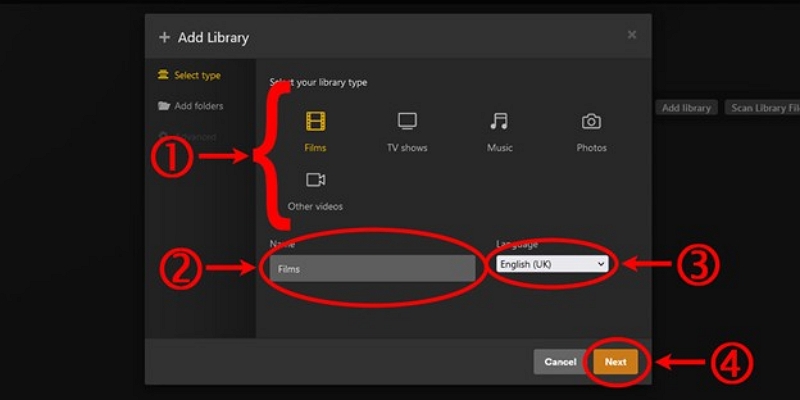
- Choose the correct library type: Movies for films, TV Shows for series — keep them separate
- Click Browse For Media Folder and select the folder containing your files
- Click Add Library — Plex automatically scans and fetches metadata, poster art, cast info, and episode details
Critical: Movies and TV shows must be in separate libraries. Mixing them causes metadata matching failures.
Step 4: Verify the scan results
After the scan completes, browse the library and confirm titles matched correctly. If anything shows as "Unknown" or with wrong metadata, see the troubleshooting section below before re-scanning.
Do You Need Plex Pass?
Adding files and watching on desktop is completely free. The costs come when you want mobile playback, offline downloads, or sharing with others.
Troubleshooting: When Plex Won't Recognize Your Files
File shows "Unknown" or wrong title
The filename doesn't match Plex's expected format. Remove codec info, resolution tags, and release group names. Use clean format: Movie Title (Year).ext. For stubborn mismatches, add the TMDB or IMDB ID to the filename.
TV episodes match the wrong show or season
Usually caused by ambiguous show names (multiple shows called "House," "The Office") or a missing year in the folder name. Add the year to the show folder name, or add the TMDB show ID. House (2004) {tmdb-1408} guarantees the correct match regardless of name ambiguity.
Movies mixed with TV shows in one library
Plex libraries are type-specific. Mixed content confuses the metadata agent. Create two separate libraries and move files to the correct locations before rescanning.
Subtitles not appearing
The subtitle file name must exactly match the video file name and sit in the same folder.
Example: video is The Batman (2022).mp4 → subtitle file should be The Batman (2022).en.srt
The language code (.en, .fr, .es) before the extension tells Plex which language the subtitle is. Plex detects matching subtitle files automatically during library scans.
Playback stutters or won't transcode on other devices
Your server hardware is likely too slow to transcode H.265 in real-time. Three options:
- Re-encode source files to H.264—broader native playback support means less transcoding load on the server
- Use a Plex client that supports direct play for H.265 (Apple TV 4K and NVIDIA Shield handle HEVC natively)
- Enable hardware transcoding—requires Plex Pass, but Intel Quick Sync and NVIDIA NVENC handle HEVC smoothly on modest hardware
Plex fetches wrong poster art or metadata
Right-click the title in Plex → Fix Incorrect Match → search manually or enter the correct TMDB ID. After correcting the match, select Fix Incorrect Artwork to refresh the poster.
FAQ
Can I watch HBO Max directly inside Plex without downloading anything? Yes, through Plex Discover. You can browse HBO Max titles inside Plex's interface, but playback always opens in the HBO Max app or website—video doesn't play inside Plex itself.
Why does Plex show my file as "Unknown"? The filename or folder structure doesn't match Plex's expected format. Use Movie Title (Year).ext for movies or Show Name (Year) - S##E## - Episode Title.ext for TV. Remove resolution tags, codec names, and release group labels.
Does adding files to Plex require Plex Pass? No. Adding local files and watching on desktop is free. Plex Pass is needed for mobile app playback (or a one-time iOS/Android unlock), hardware transcoding, offline sync, and shared libraries.
What video format works best in Plex? MP4 or MKV with H.264 video and AAC or AC3 audio. H.264 has the broadest native playback support across Plex clients, which minimizes transcoding load on your server.
Can I share my Plex library with family? Yes—once files are in your local Plex library, you can share with other accounts. The server host needs Plex Pass to share libraries.
How do I get subtitles to work in Plex? Name the .SRT file exactly like the video file and place it in the same folder. Add the language code before the extension: Movie Title (Year).en.srt. Plex detects matching subtitle files automatically.
Conclusion
There are two main ways to integrate HBO Max with Plex. The first is using Plex Discover, which allows you to browse HBO Max content within Plex but redirects playback to the Max app. The second method is adding downloaded HBO Max videos to your local Plex library, which enables direct playback, offline viewing, and full control over your media files.
No. Plex Discover can show HBO Max titles in its interface, but it cannot stream them directly. When you select a title, Plex opens the Max app or website for playback. To stream through Plex itself, you must first download the video and add it to your Plex media library.
Plex relies on file names to identify and organize content automatically. Proper naming ensures that movies and TV shows are matched with the correct metadata, artwork, and episode details. Incorrect naming can cause Plex to misidentify files or fail to display them properly in your library.
External subtitles should be saved as .SRT files and named exactly the same as the video file. For example, if your video is named Show.Name.S01E01.mp4, the subtitle file should be Show.Name.S01E01.srt. Keeping the same name allows Plex to detect and load subtitles automatically.