

You open Max and nothing plays. Or you’re suddenly logged out, told you’re “not subscribed,” or stuck on a black screen that never finishes buffering. Sometimes it works on your phone, but not on your TV. That disconnect is frustrating — and very common.
Good news: most Max issues in 2026 fall into a few predictable patterns, and many of them aren’t your fault.
Quick context: HBO Max is now branded as Max, and the 2023 rebrand came with major changes to apps, accounts, and device support. Older devices and outdated apps are more likely to break — even if your subscription is active and paid.
This guide explains what’s happening, why it’s happening, and how to fix it without wasting time.
Part 1: Identify Your Problem First
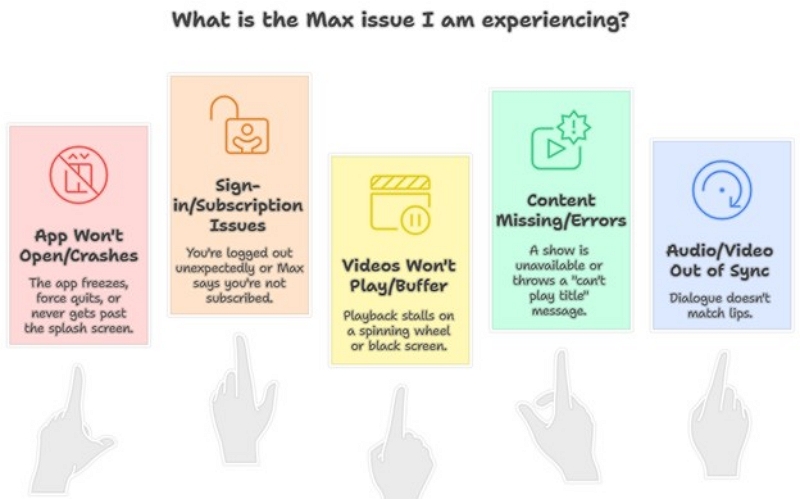
Before you dive into fixes, start with the most important step. Figure out which Max issue you’re actually dealing with. Most problems fall into one of these five categories.
A. The app won’t open or crashes
You tap the Max app and it freezes, force quits, or never gets past the splash screen.
B. You can’t sign in or it says you’re not subscribed
You’re logged out unexpectedly, or Max insists you don’t have a subscription — even though you do.
C. Videos won’t play or keep buffering
The app opens fine, but playback stalls on a spinning wheel or black screen.
D. Content is missing or shows errors
A show you watched yesterday is suddenly unavailable or throws a “can’t play title” message.
E. Audio and video are out of sync
Dialogue doesn’t match lips, especially on older TVs or streaming sticks.
Knowing which bucket you’re in makes the fix much faster.
Part 2: Try These First (Fixes That Solve Most Issues)
If Max won’t load past the purple screen or refuses to play anything, start here. These steps solve the majority of issues across all devices.
You sit down to watch the finale, open Max — and it just sits there. Before assuming something is broken, try the basics:
Step 1: Restart the app and device
Fully close the Max app (don’t just minimize it), then restart your phone, TV, or streaming device. This clears stuck processes and memory glitches.
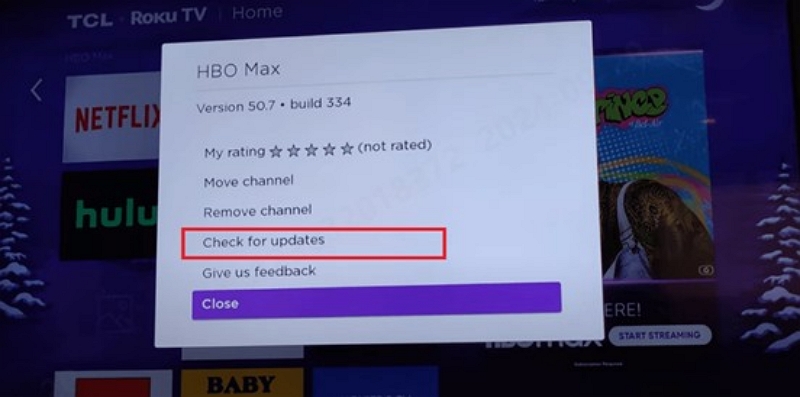
Step 2: Check for app updates
Open your device’s app store and search for “Max.” If there’s an update, install it. Some older HBO Max app versions stopped working after the 2023 rebrand.
Step 3: Log out and back in
Even if you’re already signed in, logging out and back in forces Max to refresh your account status. This often clears “not subscribed” errors.
Step 4: Try another network
Switch between Wi Fi and mobile hotspot. If Max works on one but not the other, the issue is likely your network — not the app.
Step 5: Check date, time, and region settings
If your device clock or region is incorrect, Max may fail to authenticate or block content due to licensing rules.
If none of these help, don’t assume the app is fundamentally broken. Most remaining problems come down to device specific quirks.
Part 3: Device-Specific Fixes
If the universal fixes didn’t solve your Max issue, don’t worry. It’s time to dig into your specific device. Each platform has its own quirks – and its own solutions.
1. Smart TVs (Samsung, LG, Android TV)
Common causes: outdated firmware, corrupted app cache, or legacy HBO Max apps from before 2023.
What to do:
- Update your TV’s system software.
- Delete the Max app and reinstall it from the TV’s app store.
- Restart the TV after reinstalling.
A clean reinstall often fixes crashes and black screens. If your TV is older than 2018 and no longer receives updates, Max may simply no longer support it. In that case, a streaming stick is usually the easiest workaround.
2. Streaming Devices (Fire TV, Roku, Apple TV)
Common causes: app update mismatches or HDMI resolution issues.
What to do:
- Update the Max app.
- Restart the device and reseat the HDMI cable.
- Temporarily lower resolution to 1080p instead of 4K.
On Roku, make sure both the device and app software are fully updated.
3. Mobile Devices (iOS & Android)
Common causes: background apps, low storage, or outdated OS versions.
What to do:
- Close background apps.
- Update the Max app.
- Restart your phone.
- Clear app cache (Android) or offload/reinstall the app (iOS).
- Confirm your OS is up to date (iOS 16+ or Android 11+ recommended).
Older phones or devices low on storage may open the app but struggle with stable playback.
4. Web Browsers
Common causes: unsupported browsers, extensions, or corrupted cookies.
What to do:
- Use Chrome, Firefox, Edge, or Safari.
- Temporarily disable VPNs, ad blockers, and privacy extensions.
- Clear cookies for max.com.
- Test in incognito mode.
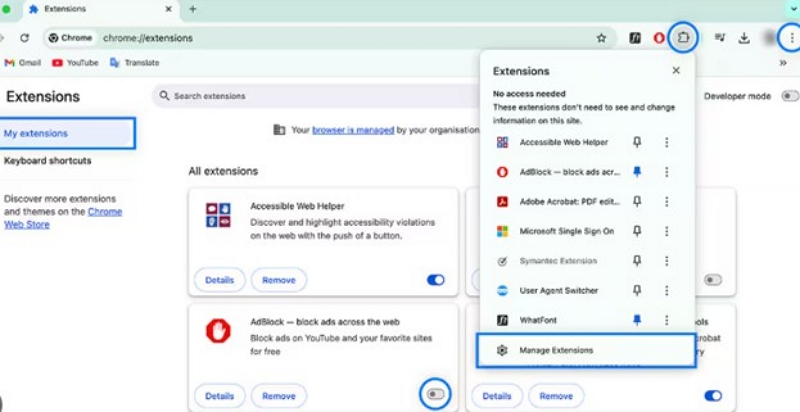
If it works in incognito but not normal mode, an extension is almost always the cause.
Part 4: Account & Subscription Problems (Very Common in 2026)
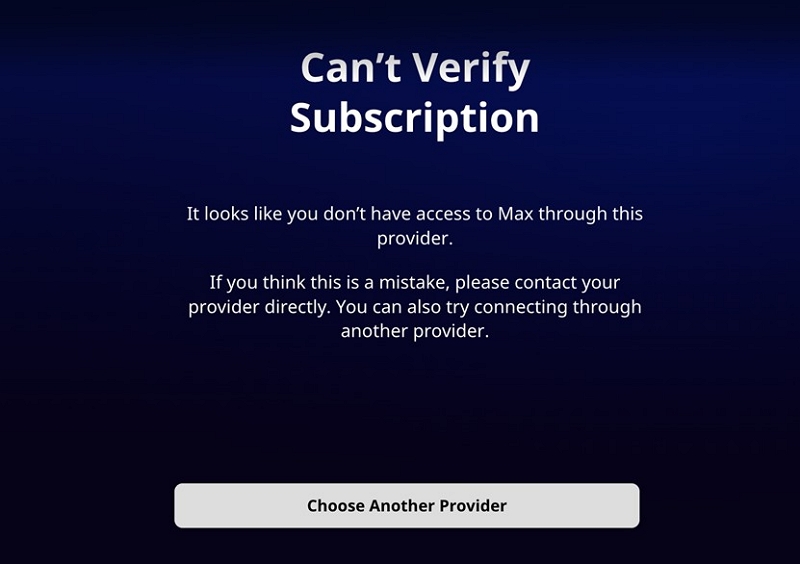
If Max suddenly says you’re not subscribed, it’s usually a billing sync issue — especially if you signed up through Apple, Google, or a cable provider.
Check your subscription status directly on the platform that bills you, then log out and back into Max to force a refresh. Most of these issues resolve once the account re syncs.
- iPhone: Settings > Apple ID > Subscriptions
- Android: Google Play > Profile > Payments & Subscriptions
If you subscribed through your cable or wireless provider (e.g., Xfinity, Spectrum, AT&T), log into your provider’s account portal and check your add-ons.
Part 5: Is Max Down or Is It Just You?
Typical scenario: Max works fine on your phone or laptop, but refuses to load on one specific TV or streaming box. Nothing else seems broken, and other apps stream normally. This usually points to a device-specific issue rather than your Max account.
If Max won’t load on any device, check outage reports on social platforms or services like Downdetector. When servers hiccup, waiting 30–60 minutes is often smarter than reinstalling apps or resetting devices.
Follow “@StreamOnMax” or check the official Max help site for real-time updates during service outages or platform-wide issues.
Part 6: When Contacting Support Actually Makes Sense
Typical scenario: You’re suddenly logged out, see a “not subscribed” message, or lose access right after a billing date—even though you know you paid. These problems often show up without warning and are usually tied to how your subscription is managed (direct vs. third-party).
Contact Max support if you’re being charged but locked out, your account was compromised, or error codes persist across devices. For app crashes on older hardware or outages, support usually can’t do much.
Pro Tip: Start with the Max Help Center or in-app support chat. It’s often faster than calling – and you’ll have a written record of the conversation.
Part 7: Offline Viewing — What Max Supports (Context Only)
You’ve tried multiple devices, basic fixes didn’t help, and the issue keeps coming back. At this point, the problem is likely on Max’s side, not something you can fully resolve on your own.
Offline downloads still work in 2026, but only on mobile devices, only on eligible plans, and only while your subscription remains active. Downloads can expire after 30 days or 48 hours once playback starts.
Tools That Help (Without Breaking Rules)
Apps like Mediaio for Video can help organize and transfer your legally downloaded Max content between devices. They don’t bypass DRM or extend access, but they can make offline viewing more manageable.
Part 8: How to Reduce Max Issues in the Future
Most Max problems feel random at first — but once you’ve seen the patterns, they usually make sense. Keeping apps and devices updated, avoiding unsupported hardware, and minimizing VPN or DNS conflicts goes a long way toward frustration free streaming.
Part 9: FAQs
Because stability matters more than raw speed. Wi-Fi interference, VPN usage, or overloaded networks can cause buffering even when your internet connection appears fast.
Older TVs that no longer receive firmware updates may no longer be supported after the 2023 Max rebrand, which can prevent the app from appearing in the app store.
Billing sync delays are common with third-party subscriptions. Logging out of your account and signing back in usually resolves the issue.
Mobile devices typically run newer app versions and handle networks better. Older TVs may struggle with newer Max app builds or compatibility requirements.
Conclusion
This is your 2026 Max survival guide — calm, practical, and grounded in real world frustration. Whether the issue is buffering, billing, or black screens, you now know when to fix it, when to wait, and when to move on without wasting time.