

If HBO Max isn’t working on your TV, you’re not alone — and in most cases, the fix is simple.
This guide shows you the fastest way to get HBO Max working on any TV in 2026, whether that’s a smart TV, a streaming device like Roku or Apple TV, or a backup option when your Wi Fi lets you down.
Once you’re set up, you’ll have smooth access to everything from House of the Dragon Season 3 and Euphoria Season 3 to new originals like Dune: Prophecy, Lanterns, and A Knight of the Seven Kingdoms. Let’s focus on getting you watching — without turning this into a tech project.
Part 1: The Fast Answer — What’s the Best Way to Watch HBO on TV in 2026?
If you just want the short version, here it is.
Quick recommendations:
- Using an older TV (pre 2022)? A Roku or Apple TV will save you hours of frustration.
- Buffering or crashing often? Use Ethernet + a streaming device.
- Want live HBO channels? Cable or live TV bundles still make sense.
- Traveling or dealing with unstable internet? Offline downloads are your safety net.
Part 2: Before You Try Anything Else: Check These 3 Things
These quick checks solve most TV problems before you buy new hardware or start troubleshooting.
1. Device Age and App Support
A TV can technically “support” the app and still struggle. Many Samsung and LG models from before 2022 lost smooth support after system updates.
What this looks like:
- App missing from the store
- Crashes after login
- Endless loading screens
Real example: A reader with a 2020 LG OLED saw the app disappear after an update. Plugging in a $30 Roku stick restored full access instantly.
Bottom line: If your TV is over 3–4 years old, a streaming device is the most reliable fix.
2. Subscription Type Confusion
Not all subscriptions behave the same on TVs.
You might be subscribed through:
- A direct Max account
- Cable or satellite
- A bundle like Hulu, Amazon Channels, or YouTube TV
Why this matters: Some bundle or cable plans don’t fully unlock the TV app.
Real example: A user could watch on their phone via Amazon Channels but got an “unsupported provider” error on their TV. Switching to a direct subscription fixed it.
Check where you’re billed from. If your subscription isn’t billed through Max.com, linking your account may fail on some TV devices.
3. Region & Account Restrictions
If the app appears on one device but not another, region settings are often the culprit.
- TVs set to unsupported regions may hide the app
- VPNs can trigger login or store errors
Quick fix: Verify your TV’s region and temporarily disable any VPNs.
Part 3: Smart TVs: When They Work — and When to Stop Trying
Smart TVs are convenient, but reliability varies.
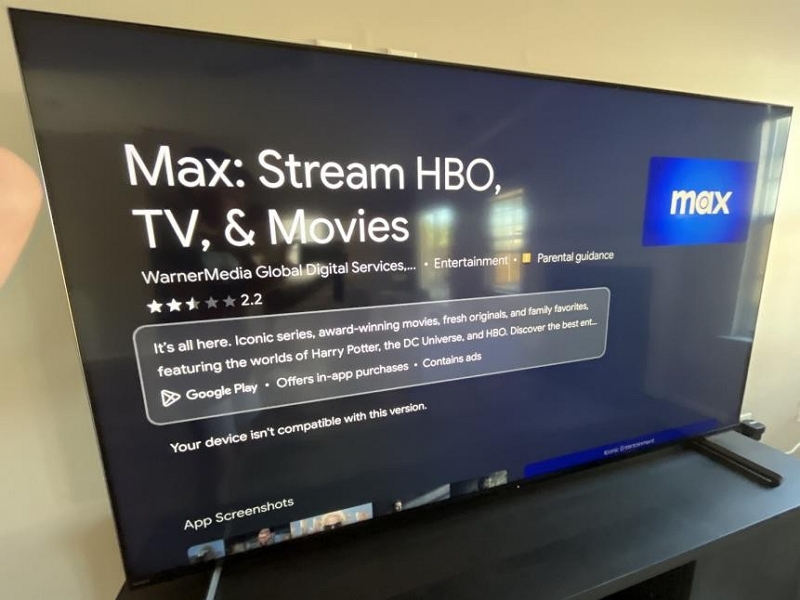
1. Supported Smart TVs (Reality Check):
TVs from 2022 or newer usually perform well thanks to faster processors and updated app stores.
Older models commonly run into:
- Login crashes
- Frozen splash screens
- “App not available” errors
Quick Setup (Only What Matters)
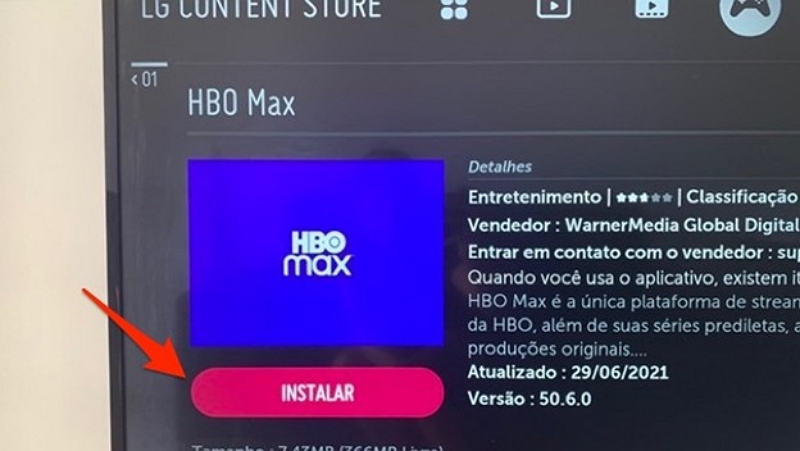
Step 1: Install the app from your TV’s store.
Step 2: Sign in using your direct account or supported provider.
Step 3: Press play.
If it crashes during setup, restart the TV and reinstall once. After that, don’t keep fighting it.
When to Stop Troubleshooting
If you’ve already:
- Reinstalled the app
- Updated firmware
- Restarted the TV
…it’s time to move on.
Real fix: A neighbor spent two hours fixing a 2019 Sony TV. A $40 streaming stick solved it in 10 minutes — with better picture quality.
Part 4: Streaming Devices — The Most Stable HBO Experience
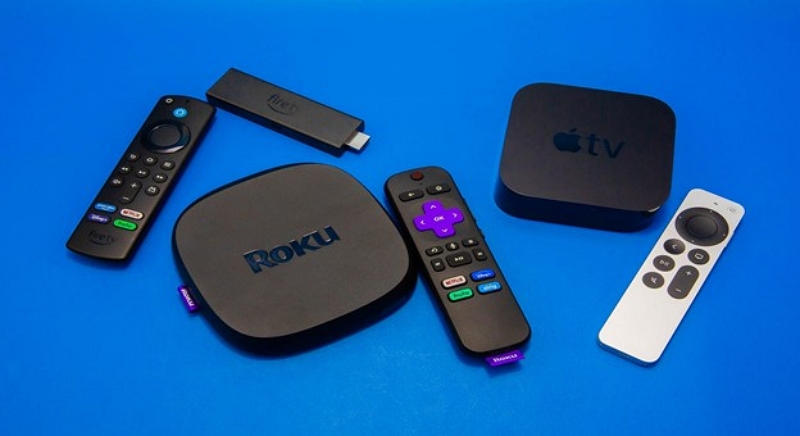
Streaming devices like Roku and Apple TV offer the most stable HBO Max experience, especially for older TVs or users tired of app crashes.
Why They Win in 2026
- Faster app updates
- Better long term support
- Fewer crashes during big releases
A small stick can outlast your TV’s app support by years.
Best Devices by Use Case
Built-in Wi-Fi extender helps in weak zones.
Great for secondary TVs or travel.
Seamless with iPhones and AirPlay.
Avoid ultra-cheap knockoffs or outdated Fire TV models. They often lag or lose support for key apps like Max.
3. Step-by-Step Setup (Short & Practical)
Step 1: Plug it in. Connect the device to your TV’s HDMI port and plug it into power.
Step 2: Connect to Wi-Fi. Use 5GHz for smoother streaming. Or plug in Ethernet.
Step 3: Install Max. Search for Max in the app store. Download and open.
Step 4: Sign in using your Max account or provider login. If you experience errors, check your subscription type.
Step 5: Start streaming. Launch the app and enjoy your show.
Most devices let you pair your phone for faster login using a QR code or a companion remote app.
Part 5: Cable & Satellite — Still Worth It?
Cable can still make sense if you value live channels and simplicity.
When It Works Well
- You already pay for HBO
- You want live broadcasts
- You don’t want extra devices
Example: A retiree watches Real Time with Bill Maher live every week with zero setup.
Limitations in 2026
- Limited app access
- Aging hardware
- No easy offline viewing
If login fails on the app, your provider may not support full access.
Streaming Bundles (Hulu, Amazon, YouTube TV)
Bundles are convenient — until they aren’t.
When Bundles Make Sense
- You already live inside one app
- You want unified billing
Common Issues
- App access restrictions
- Region lock confusion
- Fewer features than direct plans
Real example: A Hulu add on user couldn’t log in on Roku. Switching to a direct subscription fixed it.
Bonus: Offline Viewing (Your Backup Plan)
Offline viewing shines when streaming fails.
When It’s Useful
- Flights
- Hotels with locked TVs
- Unstable home internet
2. Mediaio Video Converter: What it does (and doesn’t)
Mediaio Video Converter helps manage legally downloaded episodes when:
- Hotel TVs won’t install apps
- Older tablets can’t play native downloads
- You want files on USB or SD cards for travel
It does not bypass DRM or replace the official app. It’s simply a management tool for content you already have rights to.
Part 8: Fixing HBO Problems on TV (Real-World Order)
If the app won’t load, crashes mid-episode, or keeps asking you to log in again, it’s usually not one random bug — it’s one of a few predictable issues.
Follow this order and stop as soon as one step works.
1. Start Here (Most Issues Are Fixed by Step 3)
Step 1: Check your account, not your TV.
Open the app on your phone, tablet, or laptop.
- Works there? Your account is fine. The problem is your TV.
- Doesn’t work anywhere? Fix your subscription or login first.
Step 2: Be honest about your TV’s age. (This is the big one.)
If your smart TV is from before 2022, app support may already be unstable.
- Updating firmware might help
- But a streaming device is often the faster, permanent fix
If you’re past this step and still stuck, stop troubleshooting the TV itself.
Step 3: Fix the network bottleneck.
Most buffering and crashes in 2026 come from Wi-Fi congestion, not the service.
- Switch to Ethernet if possible
- Or reduce other streaming traffic
Step 4: Use a streaming device and move on.
If none of the above works, plug in a Roku, Fire TV, or Apple TV.
It’s usually faster than any further TV-side fixes.
Real example: A 2021 Samsung TV stuck on the splash screen worked instantly after switching to a Roku Streaming Stick 4K.
2. Common Issues (What’s Actually Going On)
App won’t load at all
Usually a memory or firmware issue on the TV.
→ Reinstall once. If it still fails, don’t keep trying — switch devices.
Login loops
Often caused by unsupported bundle logins or corrupted app data.
→ Clear cache or confirm your provider supports full app access.
Buffering during peak hours
Almost always a Wi-Fi issue.
→ Ethernet, less traffic, or offline downloads.
FAQs (Only Questions People Actually Ask)
No. You can stream HBO content on your TV using the Max app with a direct subscription — no cable required. All you need is a smart TV or a streaming device like Roku, Fire TV, or Apple TV.
Yes. Services like YouTube TV, Hulu + Live TV, and DirecTV Stream offer live HBO channels as part of their bundles. Just make sure your plan includes live HBO, not just on-demand Max access.
This usually happens when your TV is no longer supported. Older smart TVs (especially pre-2022
Samsung, LG, or Sony models) may lose access after firmware or app updates.
A quick fix: Plug in a streaming device to restore access.
Conclusion
If watching HBO on your TV feels harder than it should, it’s not your fault. The ecosystem really is fragmented in 2026.
The good news? Once you choose the right setup — usually a simple streaming device — everything settles down and just works. Focus on the shows, not the settings.