

“I canceled, but I’m still being charged.”
“There’s no cancel button anywhere.”
“Is this billed by Max, Apple, or my TV provider?”
If any of these sound familiar, you’re not alone. In 2026, canceling HBO Max (now branded as Max) often goes wrong because users cancel in the wrong place. This guide clears the confusion and shows you exactly how to cancel—correctly, safely, and permanently.
You’ll learn how to:
- Identify who is actually billing you (Max, Apple, Google, Amazon, Hulu, or a TV provider)
- Cancel without losing access early
- Confirm cancellation so future charges truly stop
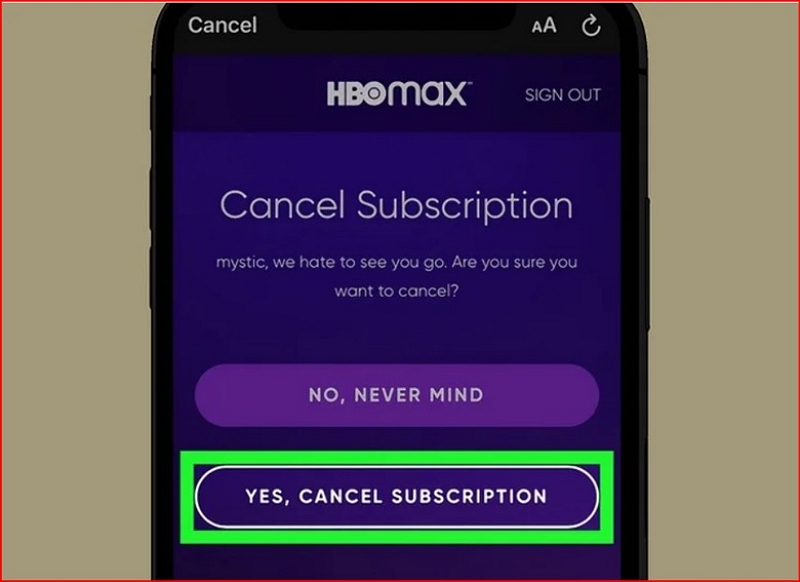
Part 1: Start Here — Find Who Is Charging You
Do not cancel anything until you confirm this.
Do not cancel anything until you confirm this. Canceling on the wrong platform does nothing.
1. Common Billing Sources (2026)
HBO Max subscriptions may be billed through:
- Max (direct) via max.com or the Max app
- Apple App Store (iPhone, iPad, Apple TV)
- Google Play (Android phones, tablets, Google TV)
- Amazon Prime Video Channels
- Cable or streaming providers (Xfinity, Spectrum, DirecTV, Hulu + Live TV, YouTube TV)
Common mistake: Users cancel inside the Max app but keep getting charged—because the subscription was created through Apple or Amazon.
2. How to Identify the Billing Source
Use one (or more) of these checks:
- Bank or card statement: Look at the merchant name. “Apple,” “Google,” “Amazon,” or “Hulu” means third-party billing. “HBO Max” or “Warner” usually means direct billing.
- Email receipts: Search your inbox for “Max” or “subscription.” The sender reveals the billing platform.
- Subscription pages: Check Max, Apple ID, Google Play, Amazon, or your TV provider’s account dashboard.
Why this matters: Canceling anywhere except the billing source will not stop charges.
Part 2: Before You Cancel — What Actually Happens After You Do
Canceling doesn’t mean instant cutoff—or guaranteed safety from renewal. Here’s what to expect.
Q. Will You Lose Access Immediately?
No. You keep access until the end of your current billing cycle.
- Cancel on Jan 10 → access usually ends on Jan 25 (your renewal date)
- No partial refunds, but no early cutoff either
Tip: Cancel shortly after a renewal to get a full month without risking another charge.
Q. Will You Be Charged Again?
Only if you cancel after the renewal deadline. Auto renew remains active until cancellation is confirmed.
What Happens to Profiles & Watch History?
- Saved (temporarily): Profiles, watch history, settings
- Removed: Downloads, recommendations
- If you rejoin later: Most users regain profiles and watch history when using the same login
Part 3: The Fastest Way to Cancel (Based on How You’re Billed)
Option A: Cancel via Max Website (Direct Billing)
Use this only if you subscribed via max.com or the Max app with a card or PayPal.
Steps:
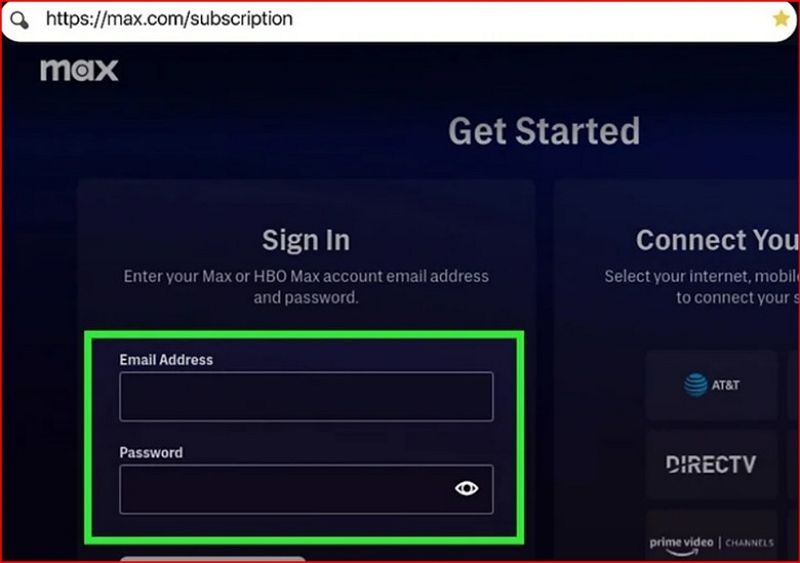
- Go to max.com and sign in
- Open Subscription
- Select Cancel Subscription
Confirmation: You’ll see an end date and receive an email. Save it.
Option B: Cancel via Apple or Google
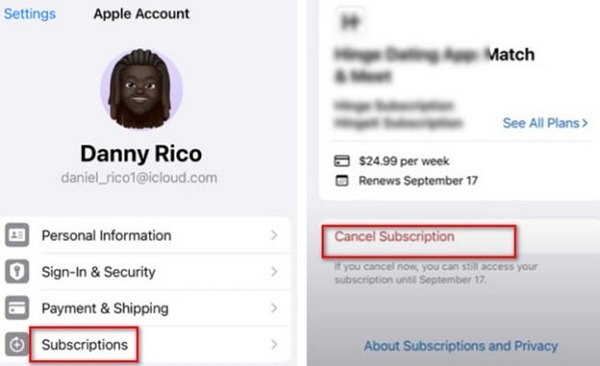
Use this if you subscribed on iPhone, iPad, Apple TV, Android, or Google TV.
Apple: Settings → Your name → Subscriptions → Max → Cancel
Google Play: Play Store → Profile → Payments & Subscriptions → Subscriptions → Max → Cancel
If you don’t see a cancel button: You’re likely logged into the wrong Apple ID / Google account—or didn’t subscribe through that platform.
Option C: Cancel via Amazon Prime Video Channels
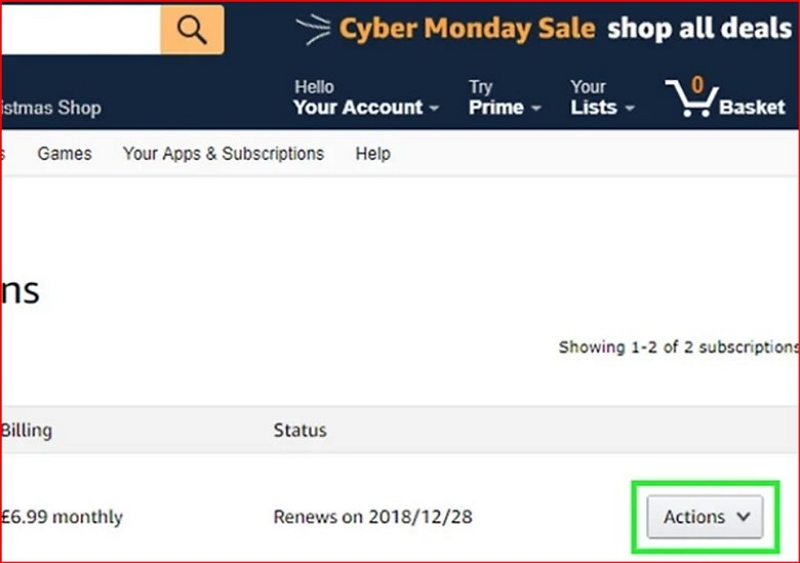
If HBO was added as a Prime Video channel:
Steps:
- Visit amazon.com/appstoresubscriptions
- Find HBO / Max
- Click Cancel Channel
Important: Canceling Prime does not cancel HBO. They’re separate.
Option D: Cancel via Cable or Streaming Providers
Applies to Xfinity, Spectrum, DirecTV, Hulu + Live TV, YouTube TV, etc.
- Cancel through the provider’s website, app, or support chat
- Some require phone or live chat
- Billing changes may take one full cycle
Part 4: How to Confirm Your Cancellation (Don’t Skip This)
You clicked “cancel,” but are you actually in the clear? Many users assume they’ve canceled HBO Max, only to be surprised with another charge the next month. Here’s how to confirm your cancellation.
Signs You’re Actually Canceled
- Email confirmation from the billing platform
- Subscription status shows “Canceled” or an end date
- No next renewal date listed
What Does Not Cancel HBO Max
- Uninstalling the app
- Logging out
- Removing payment methods
If you still see a renewal date, you’re not done.
Part 5: Still Being Charged? What to Do Next
Common Reasons
- Canceled on the wrong platform
- Multiple overlapping subscriptions
- Cancellation happened after renewal processed
Step by Step Fix
- Reconfirm the billing source (Part 1)
- Cancel directly on that platform
- Contact support if charged after confirmed cancellation
Support paths:
- Max: help.max.com
- Apple: reportaproblem.apple.com
- Google: Play Store → Subscriptions → Refund
- Amazon: appstoresubscriptions → Support
- Cable / Streaming: Billing support
Chargeback: Last resort only, with proof of cancellation.
Part 6: Before You Cancel — Cheaper Alternatives Worth Considering
If cost—not content—is the issue:
- Downgrade your plan (Ad supported is cheapest)
- Bundle HBO with Hulu, Prime Video, or YouTube TV
- Rotate subscriptions monthly instead of paying year round
Canceling is still best if you’re not actively watching anything.
Part 7: After Canceling — Access & Backup Considerations
Canceling HBO Max doesn’t mean that you’re instantly locked out of your account. You still have time to wrap up your shows, manage downloads, and prepare for life without the app.
1. What Access You Keep Until Expiration
After canceling. You’ll retain full access till the end of your current billing cycle. That includes:
- On-demand viewing: You can stream anything in the Max library, movies, serials, and specials, just like before.
- Device limitations: You’ll still be able to watch on all your usual devices, such as TV, phone, and tablet, unless your subscription tier has device limits. For example, the ad-supported plan restricts downloads or simultaneous streams.
Real-life scenario: One of my neighbors canceled on March 10, but streamed Tokyo Vice through March 28, when their billing cycle ended. No interruptions, no surprises.
2. Offline Viewing (Context Only)
If you downloaded content before canceling, you can still watch it offline until your subscription officially ends.
- Useful for travel or unstable internet: Great for flights, hotels, or rural areas with weak Wi-Fi.
- Requires valid access at the time of download: You must be an active subscriber when downloading. Once your subscription ends, those downloads will expire.
- Not a replacement for an active subscription: You can’t keep watching indefinitely. Downloads are tied to your subscription status and will stop working after your access ends. You can use tools like Mediaio Video Converter to manage and transfer their legally downloaded content to other devices. It helps to organize your offline library, but it doesn’t replace subscription or bypass HBO’s download rules.
Part 8: FAQs
Usually, no. HBO Max subscriptions—whether billed directly or through Apple, Google, Amazon, or a TV provider—are prepaid and non-refundable. When you cancel, you keep full access until the end of your current billing cycle, but you won’t receive a refund for unused days. In some cases, platforms like Apple or Google may offer a one-time courtesy refund if you were just charged, but you must request it quickly through their official refund tools.
To identify your billing source, check your bank or credit card statement, look for email receipts, or review your subscription settings in Max, Apple ID, Google Play, Amazon, or your cable/streaming provider account. Confirming the correct platform is essential, because canceling through the wrong source will not stop charges.
Yes, you can resubscribe at any time using the same account. Your profiles, watch history, and settings are typically saved for several months, though downloads will need to be re-downloaded. Returning with the same login and billing method usually allows your account to resume where you left off.
Canceling may not stop charges if you canceled on the wrong platform, after the renewal date, or have multiple active subscriptions under different platforms. To fix this, check your billing source, confirm your subscription status, and contact the platform’s support if necessary.
Conclusion
Canceling HBO Max in 2026 isn’t hard—but it is precise. Find the billing source, cancel in the right place, confirm the end date, and keep proof. Do that, and your next HBO charge will truly be your last—until you decide to come back.