

You’re on a flight. No Wi-Fi. Headphones on. You open HBO Max—only to find the download button greyed out. No clear warning. Maybe it flashes “Download limit reached.” Maybe it says nothing at all.
That’s the frustrating part of HBO Max downloads: the limits are real, but rarely explained. What you can download isn’t controlled by one simple number. It depends on your plan, your devices, the profile you’re using, and even where you are. Most people only realize this once something breaks.
This article is written for that moment. Before you start deleting everything, it helps to understand how HBO Max actually counts downloads—and which problems you can fix in seconds once you know what’s really happening.
Part 1:Quick Answer — What Is the HBO Max Download Limit?
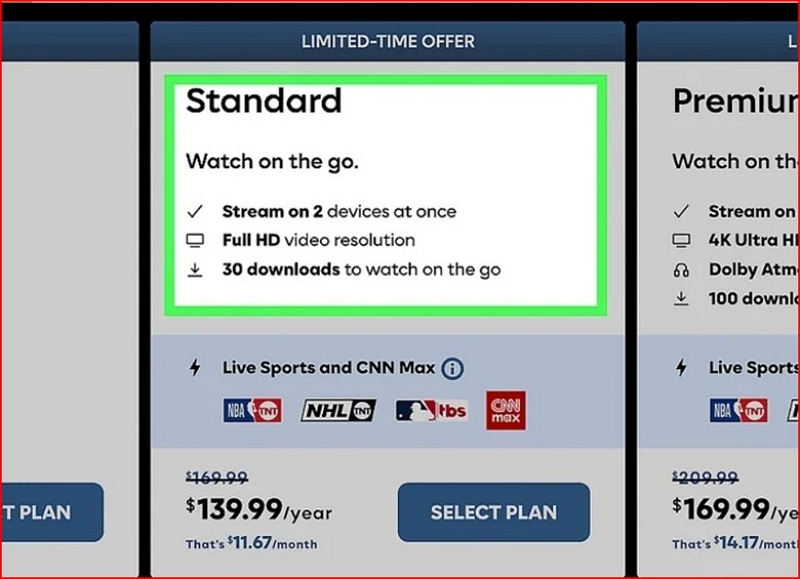
For most ad-free plans, HBO Max allows up to 30 active downloads per account. Download availability and flexibility may vary slightly by region and subscription tier. Downloads also expire—either 30 days after download or 48 hours after playback starts. Only Standard and Premium (ad-free) plans support offline downloads.
In short: HBO Max limits downloads by plan, account, and licensing, not by how much storage your phone has.
Part 2:HBO Max Download Limits by Plan
You download 10 episodes on your phone. Your partner grabs 15 on their tablet. Your kid downloads 5 more on an old iPad you forgot about. Suddenly, you hit the 30-title cap—and the next download button is greyed out with no explanation.
That’s the HBO Max download limit in action.
2.1 How Many Downloads Are Allowed per Device?
There’s no per-device cap. HBO Max tracks downloads per account, not per phone or tablet.
- The 30-title limit applies across all devices and profiles
- Phone vs tablet makes no difference to the rules
- Storage still matters: if your device is full, downloads fail even under the cap
2.2 How Many Devices Can Download at the Same Time?
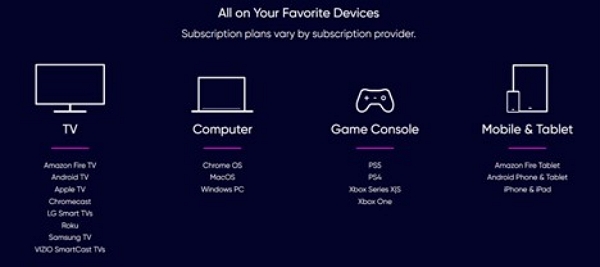
- Up to 5 devices can be registered on one HBO Max account
- All 5 can download and watch offline at the same time
- Downloads are tied to a specific device and profile
- You can manually remove devices to free up slots
This works fine—until a sixth device tries to join. At that point, someone gets blocked, and the only fix is removing an old device from the account.
2.3 Title-Based Download Restrictions
Not all limits are about your account.
- Some titles have per-season or per-episode caps
- Certain shows or movies aren’t downloadable due to licensing
- Titles leaving HBO Max may disable downloads entirely
- You may see “Download not available” with no explanation
If only part of a season downloads, it’s usually a licensing rule—not a bug.
Part 3: Why HBO Max Says “Download Limit Reached”
30-Second Download Limit Self-Check (Find the Real Cause Fast)
Before you start deleting downloads or upgrading your plan, take 30 seconds to run through this checklist. Most “Download limit reached” errors fall into one of these buckets.
✅ 1. Is the download button greyed out with no error message?
Yes → Likely an app sync or cache issue, not a real limit
No → Keep going
Fix: Force close the app → sign out → reconnect to Wi-Fi → try again
✅ 2. Did you recently switch phones, tablets, or profiles?
Yes → Old device downloads may still be counted
No → Keep going
Reminder: Downloads are not portable. New phone = new download quota pressure.
✅ 3. Do you have expired or half-watched downloads sitting on your devices?
Yes → They still count, even if they won’t play
Not sure → Check the Downloads tab on each device
Fix: Manually delete expired or unused downloads
✅ 4. Are other people using the same HBO Max account?
Yes → Their downloads count against your limit
No → Keep going
Common surprise: One person binge-downloads a full season and silently maxes out the account.
✅ 5. Are you trying to download on a Kids Profile?
Yes → Kids profiles have stricter download rules due to built-in content filtering and parental control policies. This behavior is intentional and not caused by a download limit bug.
No → Keep going
Test: Switch to a regular profile and try again
✅ 6. Did you recently travel or change regions?
Yes → Licensing validation may block downloads
No → Keep going
Note: Region changes can make downloads disappear or fail without warning.
If you checked more than one box, you’re not hitting a single limit—you’re hitting stacked restrictions.
Greyed-Out Download Button? It’s Not Always the Limit
Sometimes HBO Max simply fails to refresh your download status, especially after:
- Switching networks
- Signing in on a new device
- Changing profiles
If restarting the app suddenly fixes it, you never hit the limit—the app just didn’t update correctly.
Most HBO Max download errors don’t point to a single restriction. They’re usually caused by multiple limits stacking quietly in the background.
Part 4: How Long Do HBO Max Downloads Last?
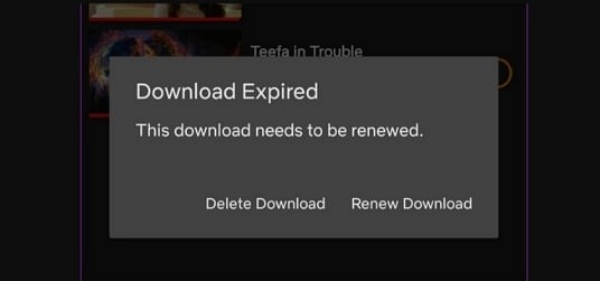
Downloads expire even if you don’t touch them.
- 30 days if you never start watching
- 48 hours after playback begins
- Titles leaving HBO Max invalidate downloads immediately
There’s usually no warning. Downloads just disappear or stop working.
Part 5: How to Fix HBO Max Download Limit Issues
5.1 Official Ways to Free Up Downloads
- Delete expired or unused downloads: Go to the Downloads tab and manually remove old titles.
- Sign out of old devices: Head to your HBO Max account settings and remove devices you no longer use.
- Re-download content properly: If a title has expired, delete it first, then re-download. Don’t just hit “renew,” which sometimes fails silently.
5.2 Why HBO Max Enforces Download Limits
- Licensing restrictions: Studios limit the number of downloads per title to prevent piracy.
- DRM: Limits help HBO Max control how long content stays playable offline and where you can watch it.
- Why unlimited downloads aren’t offered: Since HBO Max licenses content from multiple providers, it can’t offer blanket offline access like a personal library.
5.3 Advanced Option: Long-Term Offline Access
This isn’t necessary for casual users, but for frequent travelers or long-term offline viewing, third-party tools like Mediaio Video Converter can offer more control by saving content locally for personal viewing—without device caps or expiration timers. It’s not necessary for everyone, but it solves problems the official app doesn’t.
Part 6: HBO Max Download Limit FAQs
No monthly cap – the limit is 30 active downloads total, not per month. You can delete and re-download as often as you want, as long as you stay under the cap.
Yes – up to 5 devices can have downloads at the same time. All 5 can download and watch offline, but the 30-title limit is shared across the account.
Downloads may disappear because they expired (30 days or 48 hours after playback), the title was removed from HBO Max, you signed out or switched profiles, or you changed regions while traveling.
Yes. Downloads are region-locked, meaning you can only download content available in your current country. They may disappear or become unplayable when you travel abroad.
Conclusion: How to Avoid Hitting the Download Limit Again
Most HBO Max download issues aren’t caused by one hard rule. They come from small limits stacking quietly in the background—old devices, expired downloads that still count, shared profiles, or regional checks you never see.
Because HBO Max rarely explains which rule you’ve hit, people end up guessing: deleting everything, logging in and out, or blaming their plan, when the fix is often much simpler.
Once you understand what still counts and what doesn’t, offline viewing stops feeling fragile and starts feeling manageable. And for frequent travelers or long-term offline viewing, tools like Mediaio Video Converter can offer more control—but for most users, clarity is what actually prevents these issues from happening again.
In the end, HBO Max download limits only feel random until you know how they’re really tracked.